PlaygroundTeaching children to code by building games, with an AI tutor that asks instead of tells.
Uncommon Playground teaches children programming by building and playing computer games in Scratch, with step-by-step guidance, quizzes and Socrates, an AI tutor that asks questions instead of giving answers. I led its design, from the brand and onboarding to the game, AI and quiz experiences.
- Role
- Lead designer: brand, UX and UI
- Team
- 2 designers, 3 developers and a product manager, with stakeholders joining for testing
Live
More than 10,000 children have access to Playground, learning to code in English, Shona, Ndebele and Swahili.
- Children with access
- 10,000+
- Languages
- 4
- Modules of games
- 4
- Context
- Uncommon
- Platform
- Web (classroom computers and tablets)
- Tools
- Figma, Scratch
In short
The problem
Many children in our coding sessions have rarely used a computer. Text-heavy tutorials lose them quickly, and instructors can't sit with every child at once.
What I did
I designed a playful brand and a guided learning flow: role-based onboarding, modules and games, a step-by-step Scratch workspace, the Socrates AI tutor, quizzes, results and multi-language support.
Context
Uncommon runs coding sessions for young learners across Zimbabwe. Children respond to games far better than to instructions, but learning Scratch on its own leaves many of them stuck on the first screen.
Playground wraps Scratch in a guided experience: children pick a game, follow short steps to build it, get help when they need it and check what they've learned at the end.
How I approached it
- 01
Observe
Watched children and instructors in coding sessions to see where learners got stuck, bored or excited.
- 02
Brand for kids
Created a bold bubble-letter identity and doodle pattern that feels like play, not school.
- 03
Guide every step
Broke each game into short, numbered steps with a video, a playable example and help one click away.
- 04
Test in the room
Tested new games and screens during live outreach sessions and refined them between rounds.
Key design decisions
- 01
Learn by building games
Modules are shown as colourful Scratch-style blocks, and each one unlocks a series of games. Finishing a game unlocks the next, so progress feels like levelling up rather than completing lessons.
- 02
One step at a time, inside Scratch
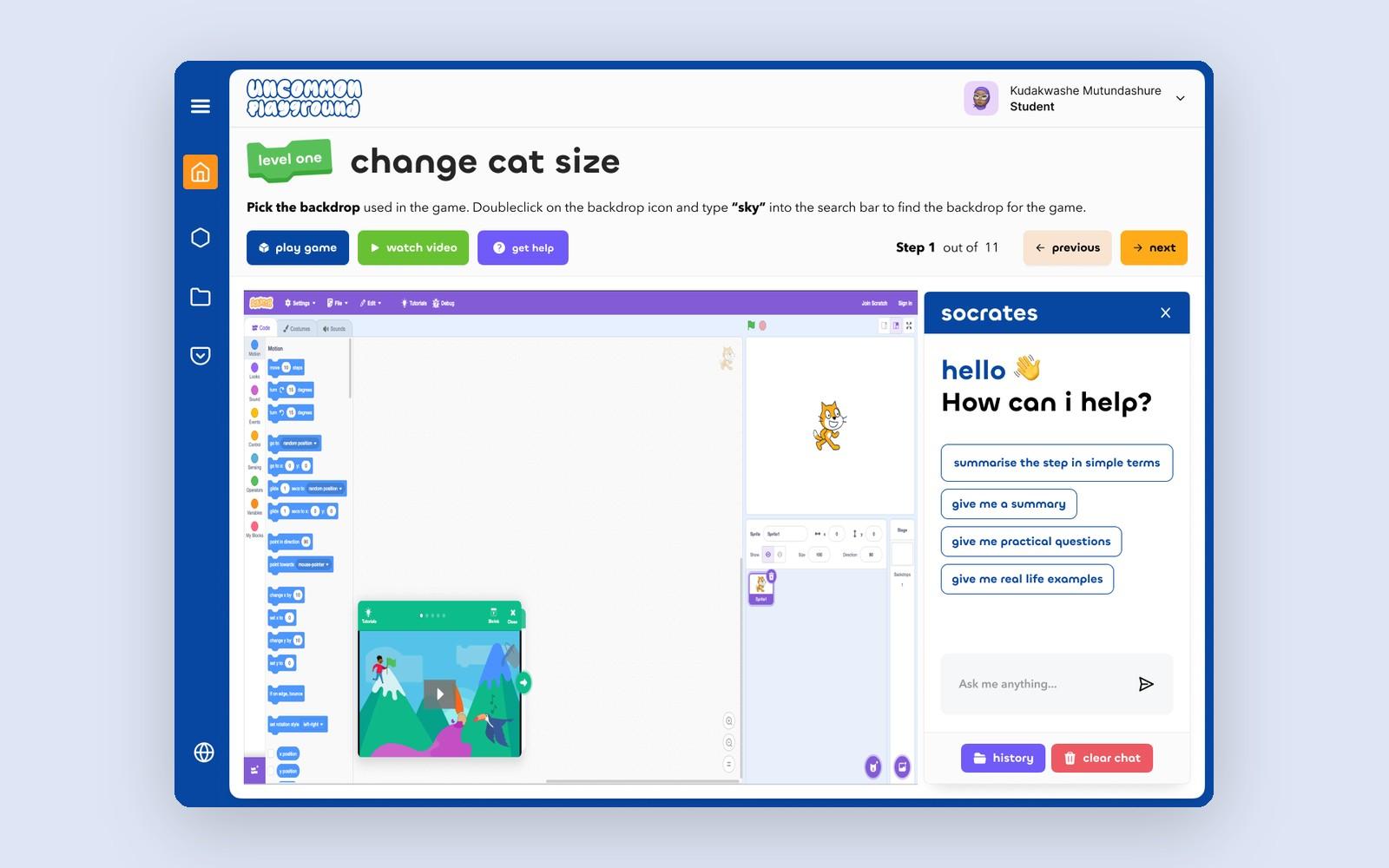
The game screen keeps Scratch in view and puts a single instruction above it, with play game, watch video and get help buttons and a clear step counter. Children always know what to do next and how far they've come.
- 03
An AI tutor that asks, not tells
Socrates opens beside the editor and offers simple prompts: summarise the step, give practical questions, show real-life examples. It's designed around the Socratic method, nudging children to work things out instead of handing them the answer.
- 04
Celebrate, then check understanding
Finishing a game triggers a celebration and a short quiz. Each question comes with a friendly clue from a character, and the results screen shows every answer before inviting children on to the next game.
In the classroom
Playground is used in Uncommon's coding sessions and outreach events, on laptops and shared screens. Watching students work through games in the room shaped what we changed next.
Reflection
Children are the most honest usability testers there are. If something isn't clear they don't complain, they simply stop — and that taught me to watch rather than ask.