ActaA practice management platform for lawyers and law firms — designed and built from idea to beta.
Acta helps lawyers and law firms manage their clients and the work around them in one place. It's my own product: I designed and built the MVP solo, then partnered with a senior developer to take it further. Law firms are now using it in beta.
- Role
- Founder: product design and MVP build
- Team
- Solo MVP, then with a senior developer
- Timeline
- 2026
Beta
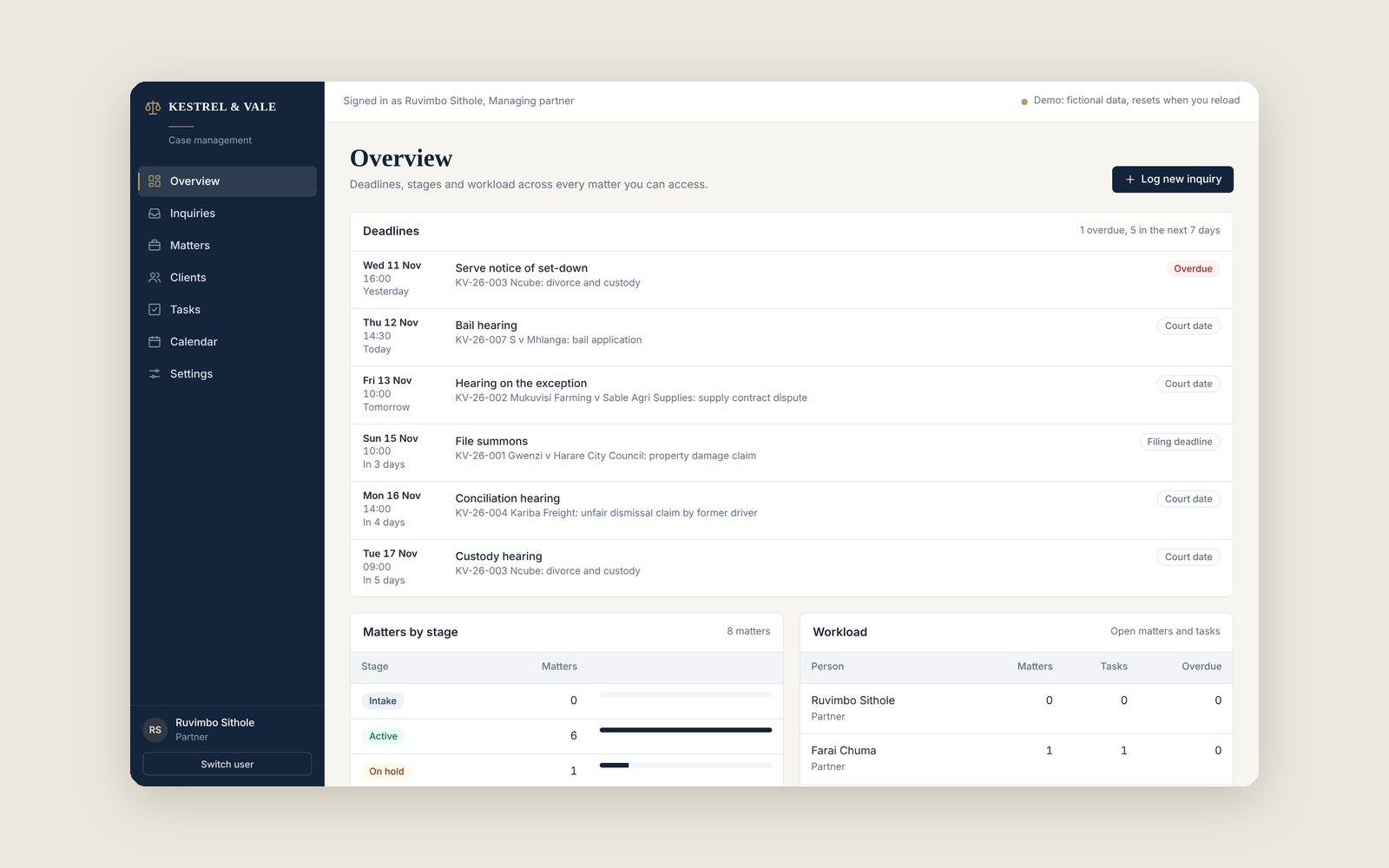
One workspace for inquiries, matters, clients, tasks and deadlines, with conflict checks, ethical walls and role-based access built in. Six law firms are using it in beta, and their feedback is shaping the next release.
- Context
- Own product · co-founded with a senior developer
- Platform
- Web app
- Tools
- Figma, Lovable
In short
The problem
Small and mid-sized law firms run clients, matters and court dates across diaries, paper files, spreadsheets and WhatsApp. Deadlines slip, conflict checks depend on someone's memory, and anyone in the office can see any file.
What I did
I took Acta from idea to working MVP on my own — research, flows, interface and build — then partnered with a senior developer to harden it for real firms.
Context
A law firm's work runs on matters: a client, the other side, a court, a team and a trail of deadlines that can't be missed. In most firms I spoke to, that information lives in diaries, paper files and chat threads, and only the people who opened a file know where it stands.
Legal work also has rules most software ignores. New clients have to be checked for conflicts before anyone takes the instruction, some lawyers must be walled off from certain matters, and not everyone in the office should see everything.
Acta started as a personal project: I wanted to see how far I could take a product on my own, from the first sketch to software that real firms rely on.
How I approached it
- 01
Understand the practice
Spoke with lawyers about how they take on clients, run matters and track court dates, and where things fall through the cracks.
- 02
Design the core
Designed the core flows — inquiries, matters, clients, tasks and the calendar — around a single matter record.
- 03
Build the MVP solo
Built the first working version myself to get it in front of real users quickly.
- 04
Partner and scale
Partnered with a senior developer to strengthen the product and launch a beta with law firms.
Key design decisions
- 01
Conflict checks before anything else
Every new contact starts as an inquiry, and the conflict check runs automatically the moment it's logged. Possible conflicts are shown in plain language — who matched, and why — and a partner has to sign off before the matter can go ahead. Declined prospects stay in the records, so future checks still catch them.
- 02
Access follows the role, and walls are visible
Partners, lawyers, paralegals and front desk each see only what their role needs: a paralegal can enter deadlines but not confirm court dates, and front desk sees matter names but never notes or documents. When someone is screened from a matter, an ethical-wall banner says so on the matter itself.
- 03
Deadlines that know what kind of date they are
Court dates, filing deadlines, consultations and meetings are different things with different consequences, so they're labelled differently everywhere they appear. The overview leads with what's overdue and what's coming in the next seven days, and the calendar groups everything by day.
Reflection
Building Acta myself changed how I design. Every permission rule and edge case I sketched, I then had to make work — which made me far more precise about what a screen really needs to do. Partnering with a senior developer let me keep that speed while making the product solid enough for firms to trust with their clients.